
Using your Bodytrace weighing scales
This is a quick guide to using your Second Nature Weighing scales correctly

Written by Cheyenne
Please note: The bodytrace scales are no longer in stock. If your scales have the Second Nature label on them, please follow these instructions here.
The Bodytrace scales will link directly to your account without you having to set them up. If they do not appear to be sending your weight readings to your account straight away, please contact our Customer Support team via the app ('Chat' >> 'Speak to Customer Support) with the ID number on the back of the scales starting with 86 and we can ensure that the scales are linked to your account.
To make sure you're using the scales correctly, you can follow a few steps, which you can also find on the FAQ sheet that came with your HealthBox.
STEP 1:
Put some weight on the scales (either tap firmly or place your foot firmly on and then off again) so that the screen turns on.
You should see:
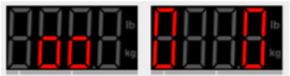
STEP 2:
Step off the scales and wait for the 0.0 reading to show.
If you do not step off the scales and wait for the 0.0 reading to show, you will see the following error messages:

STEP 3:
Step on the weighing scales to take a weight reading.
Your weight reading will then show up in your account on the Second Nature app.
If you're experiencing any problems or receiving an error message, you can find some solutions here.
If you have any questions, please don't hesitate to reach out to us through our Customer Support team from the 'Chat' page in-app.